Teacher and student

The 4th session of Feather Boot Camp got underway on Monday.  It’s going well — and with the switch to a new shopping cart, my life got about a bazillion times easier.  The switch automates a huge chunk of what I was doing before, and while there have been a few glitches, and there is still room for me to screw things up, ultimately, this has been about 1000% less stressful than previous class launches.

The first week of class is typically pretty quiet, but so far so good.

I continue to find it ironic that I have turned into a teacher.  I was going to be a music teacher, but decided after my freshman year at Ithaca College that I didn’t really have any interest in teaching.  Maybe it was more that I didn’t have any interest in teaching people under the age of 20.

Here I am, though, teaching machine quilting classes, writing instructional books for machine quilting, and supporting the people who use the MQResource forums, teaching them how to use it.

I’m teaching myself a bunch of new stuff lately, too.  Well, not new stuff, just trying to be a little more official about some things:  I fake my way through a lot of the website stuff I have gotten myself in to.  I’m not afraid of software and of figuring things out, but I have been painfully aware that I was only scratching the surface of the technologies that I have been using.  So, I’m working on officially learning things like HTML/CSS/PHP/ and a bazillion more acronyms plus all of the programs that web designers use to do their jobs.  It has meant getting reinterested in using Photoshop, and the other day I saw that Angela was taking a class from my favorite scrapbooking teacher, Jessica Sprague.  Turns out the class is the next step in her progression of digital scrapbooking classes, and on a whim I signed up for it.  She assumes a lot with this class, that you can figure out how to do some things on your own, so I kept having to stop and drag things out of the recesses of my brain.

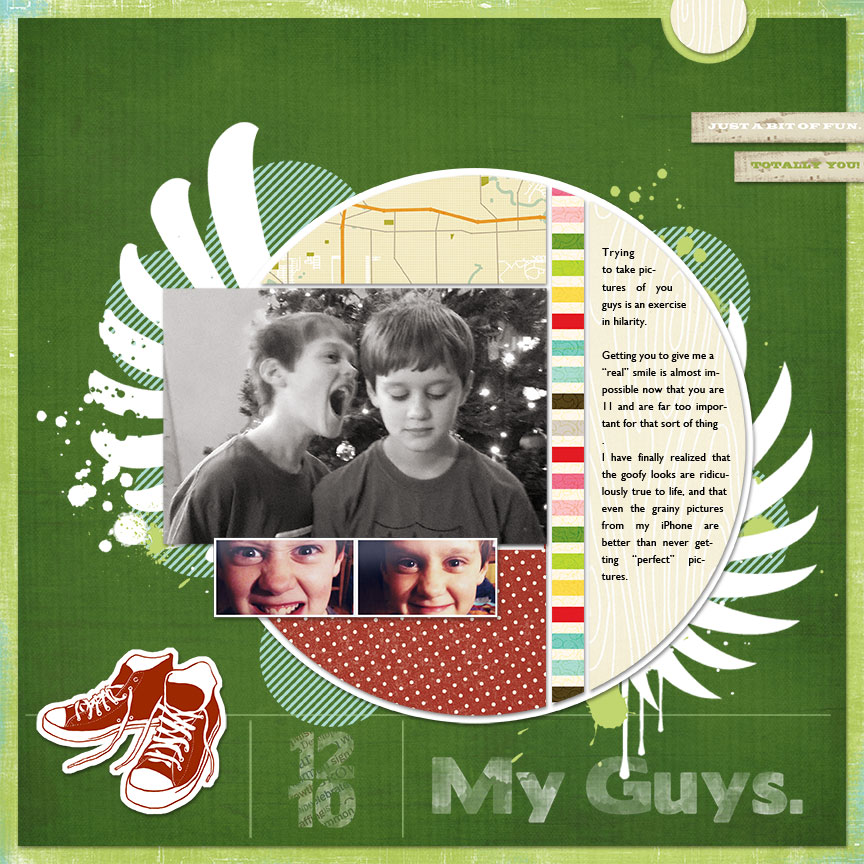
This is what I did this morning, using photos of the boys from our Christmas time photo shoot:

lesson 3 Teacher and student

The papers and elements were all provided in class, and I pretty much followed her recipe, but there were several times that made me say out loud “THAT IS SO COOL,” so hopefully I can remember them again when I need them.  It’s not so much that I want to spend a lot of time digi-scrapping, but I thought that things I can learn from her will be useful for the web design stuff that I am learning in other ways.

One cool thing is the stripe generator — http://www.stripegenerator.com — used to make the stripes for the circles in the background.  I like me some stripes.  And polka dots.

This also serves as warning that I will probably occasionally babble about web design/development kinds of things here.  I’ll try to keep the technobabble to a minimum.

Computers are cool

I know.  Last week I was bemoaning about how UNCOOL computers are.  But today, I just did something cool and geeky and fun, and it makes me like computers again.  For the moment.

note from me Computers are cool

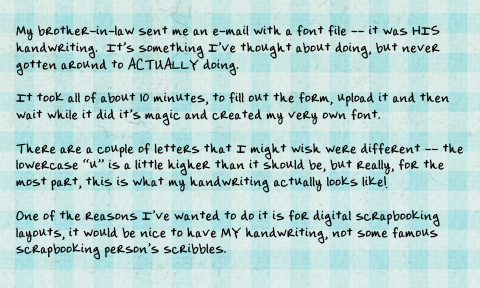
Of course, I couldn’t let my brother-in-law have something cooler than me, so I had to go do my own.  I suspect that his handwriting is nicer than mine, but don’t tell him I said that.

To get your OWN handwriting font, you have to go to http://www.yourfonts.com and follow the instructions.  You have to print a form that you write your letters on, scan it, upload it to their website, and then in just a few minutes it generates your very own font.  I have even have my signature , though I need to go figure out how to get that…hmmm.

I’m up to something like 162 entries in the drawing for the quilt…just 3 more hours until I close it and we draw!

suzannesig Computers are cool

Computers, part deux

Shortly after I wrote my earlier post, I decided to actually attempt to do a little troubleshooting, and fired up my laptop.  Network worked just fine on it, so now I don’t know what to think.  I’ll have to try moving the laptop to the front counter to see if it is locational, and if it’s not…well, then, I guess we’ll know it’s the computer (which happens to be the new Mac, and…I guess I’m going to learn a lot more about how my Mac works!)

Photos from yesterday and today:

3218836353 b882d9eaba Computers, part deux

I cheated a tiny bit. I took a number of photos last night, I wasn’t looking through the eye-piece, just holding the camera at about my stomach, snapping pictures. The picture I took that captured the word Lost on the TV — the knitting was blurry. So, I cut the TV screen out of that one, pasted on top of the TV in this picture and VOILA!  (I worked on my sweater some last night.  Long way to go yet.)

Yes, I’m weird. And geeky. And just the slightest bit addicted to several TV shows right now. I got to choir last night at 7 and informed the choir director that I HAD to be home before 8. I didn’t tell him why, but my Mom knew. Thankfully, she didn’t give me away.

3219681164 03edbcc366 Computers, part deux

I took about 25 pictures of Katie. She basically ignored me. The lighting in here tonight is terrible, which means the camera takes longer to expose the pictures. Holding it by hand gave me very blurry pictures. I set some books down on the floor, the camera on top and got some great pictures. So there’s your photography tip for today. Actually, two tips. Get down on the same level as your subject and use something to balance your camera (it was sitting off the floor as far as Don Quixote and a Moleskine journal would lift it). Books, tables, chairs, counters all work as stand-ins for tripods.

And on that note, it’s time to stop letting the sleeping dog lie and send her out for her last trip of the day to the great outdoors.

Come on Katie, time to wake up so we can go to bed!

Reading blogs

Three posts in one day!

Some of my longarm quilting buddies are starting to blog on WordPress, and some of the people that were reading their old blogs at other places have commented about trying to remember to visit the new blogs.  I wanted to post and make a suggestion that the best way to keep up on the many blogs that you might be interested in is with an RSS reader.

Yes, I can hear you all saying “Huh?  What the heck is that?”

An RSS Reader is a piece of software that automatically checks all of the blogs that you want to keep track of and presents the new posts to you in one place.  If you want to comment, you can click on the blog post and be taken directly to the blog you were reading.

I used to use Bloglines (http://www.bloglines.com) but have recently switched to Google Reader (http://reader.google.com) .  Both are very easy to use.  Another one to try is http://www.blogarithm.com — that site will actually send you a daily e-mail with links to any blogs that have been updated.  These are just a few of the sites that are available.  There are also RSS readers that you can download to your computer, but I don’t have any experience with those.  You do have to create accounts at these places, but the sites are pretty easy to use.  When you find a blog you keep track of, you just highlight the web address of the site, enter it into the appropriate “add subscription” place in your reader of choice and…voila!  Easy peasy….

And to my friends and acquaintances that have recently moved their blogs to WordPress, I say welcome!  Add me to your blogroll, and I’ll add you to mine!

TTFN-

Suzanne

pixel Reading blogs